

In the modern professional landscape, the home office has transitioned from a temporary setup to a permanent fixture in our lives. However, many of us overlook the physical toll that a poorly designed workspace can take on our bodies. Incorrect posture and improper furniture alignment are leading causes of chronic neck pain, backaches, and general physical fatigue.
To help you stay productive and healthy, here is a comprehensive guide to setting up an ergonomic home office that prioritizes your well-being.
1. Optimize Your Desk Space
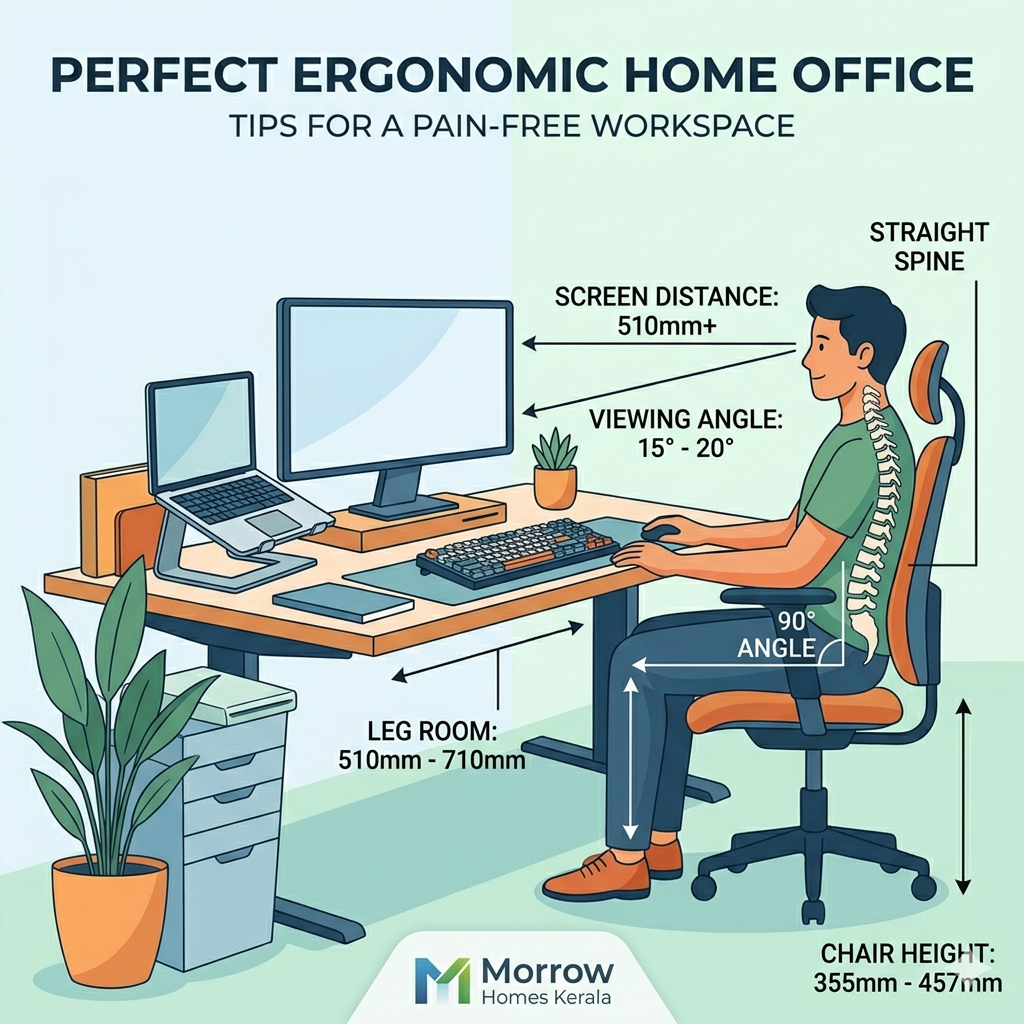
The foundation of a good workstation is having enough room to move. One of the most common mistakes is a cramped desk area that restricts leg movement. To ensure comfort, there should be a clear space of 510 mm to 710 mm beneath your desk.This allows you to stretch and position your legs naturally, preventing stiffness during long hours of work.
2. Perfect Your Seating Height
Your chair is perhaps the most critical element of your setup. A chair that is too high or too low can put undue pressure on your spine and thighs. Ideally, your chair height should be adjusted between 355 mm and 457 mm. When sitting, pay close attention to your body’s angles: your hips and knees should remain at a 90-degree angle. This posture supports the natural curve of your spine and promotes better circulation.
3. Maintain Spinal Alignment
It is easy to find yourself slouching as the day progresses, but keeping your spine straight is essential for long-term health. Avoid leaning forward or hunching over your laptop. Sitting upright not only prevents back pain but also improves your focus and breathing.
4. Screen Placement and Eye Health
Eye strain is a frequent complaint for those working digitally. To protect your vision, the distance between your eyes and the screen should be approximately one arm’s length, or at least 510 mm.
Furthermore, the angle at which you view your monitor matters. Positioning your screen so that your viewing angle is between 15 to 20 degrees is considered the most suitable for reducing neck strain. This ensures you aren’t constantly looking too far up or down, which can lead to cervical discomfort.
Conclusion
Investing a little time into the ergonomics of your home office can yield massive returns in terms of health and productivity. By following these specific measurements and posture tips, you can transform your workspace into a sanctuary of efficiency rather than a source of physical stress.
Remember, a healthy body is the most important tool in your professional toolkit. Start making these adjustments today to ensure a more comfortable and sustainable work-from-home experience.
Watch More: https://youtube.com/shorts/hHjqDxvnwWI?si=h2yOlizAfWlikmyh